“Let me stash this first.”
A hotfix shouldn’t put your feature on hold. Keep each branch checked out in its own worktree.
Pick up where you left off
GIT WORKTREES. LOCAL SERVICES. CONNECTED AGENTS.
Canopod keeps your branches, services, and databases organized.
Work from the app, or let your coding agent handle setup through MCP.
INTRODUCING CANOPOD MCP
Give Claude Code or Codex a clear picture of your workspace. Let it inspect worktrees, run your configured setup, and manage services, using the repositories and permissions you choose.
Claude Code · Codex · Compatible local MCP clients
Connect locally. Share access deliberately.
WHEN ANOTHER BRANCH NEEDS YOUR ATTENTION
You just wanted to review a PR.
Now you’re stashing changes, freeing a port,
and wondering which database you migrated.
A hotfix shouldn’t put your feature on hold. Keep each branch checked out in its own worktree.
Give each worktree its own stable service ports. Keep your branches running alongside each other.
Configure a Postgres database per worktree. Try a schema change without sharing the same database.
PARALLEL, WITHOUT THE CHAOS
One repository. Independent workspaces.
Each with the services, ports, and context it needs.
Select a branch to see its workspace. Example ports and databases; configure your own setup once.
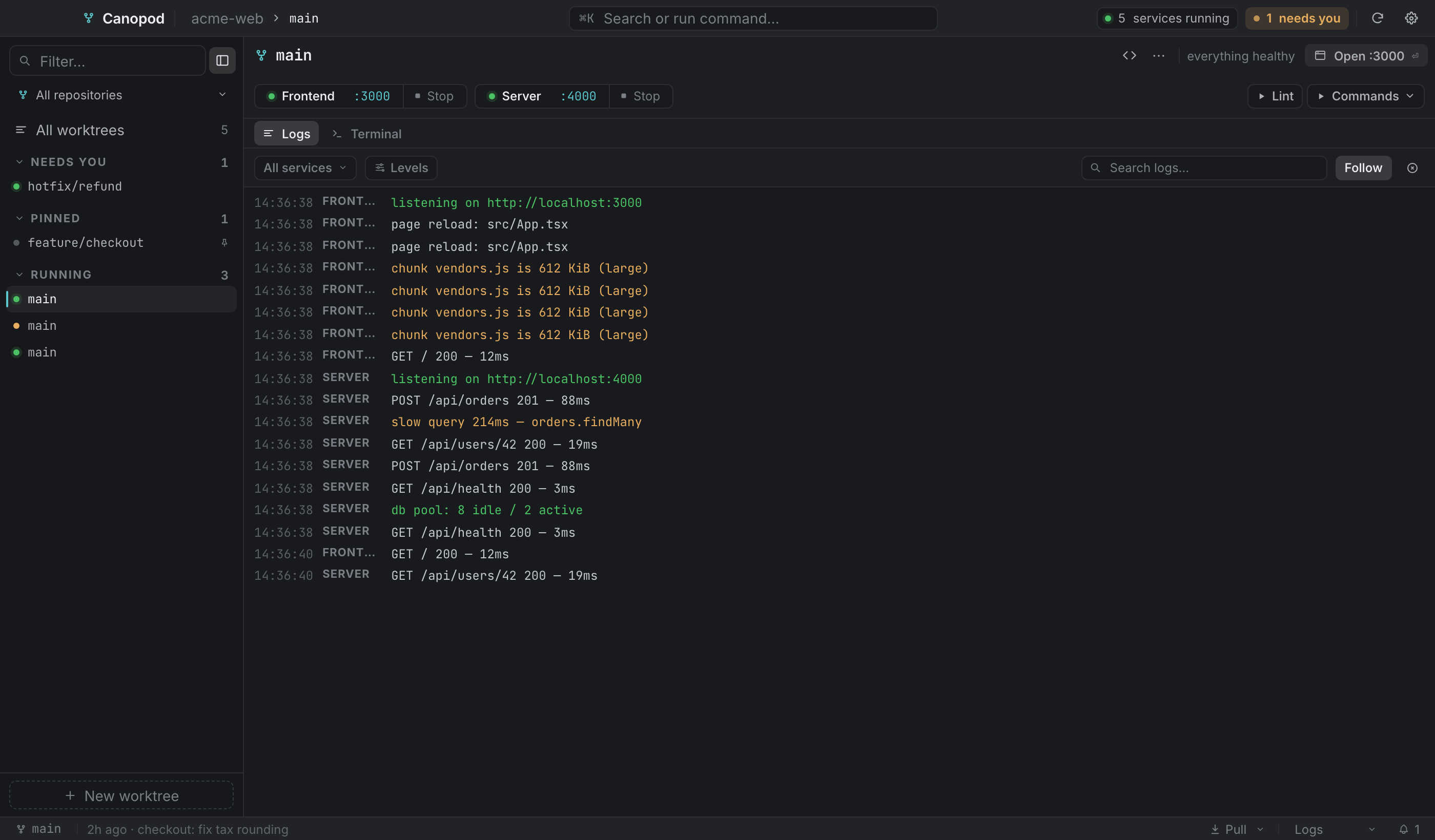
Start and stop services, read their logs, and open a shell in the right worktree. All together, instead of scattered across your desktop.
Explore terminals & logs:3010 Server :4010$ git branch --show-current
feature/checkoutGET /checkout200GET /api/cart200Give Claude Code, Codex, or your favorite CLI the task, branch, ports, and database in a structured handoff. The agent knows where to start.
See how agent handoffs workBuild the new checkout.
The context to pick up where you left off.
BUILT FOR THE WORK BETWEEN COMMITS
Run a review branch alongside your current feature, with its own services and ports.
Review without the shuffleHOTFIXESGive the fix a separate worktree and leave your unfinished feature where it is.
Make room for a hotfixCODING AGENTSKeep agent sessions with the branch, runtime context, and services they belong to.
Work alongside your agentsFROM REPO TO RUNNING
Point Canopod at a local repo. Review detected Node services, or add the commands your stack needs.
Add repositoryChoose a branch or tag. Canopod creates its worktree and runs your configured setup steps.
New worktree ⌘ NRun your services, open the app, and get to work. Your other branches can keep doing their thing.
Start servicesMAKE ROOM FOR YOUR NEXT IDEA
Your machine. Your branches. A little less friction.
For macOS on Apple Silicon (M1 and later).
Download for macOSbrew install --cask emidhun/canopod/canopodHomebrew is recommended. Installing the DMG? Canopod isn’t notarized yet. Follow the first-launch steps.
64-bit x86 packages. Choose your preferred format.
Linux packages build in CI but haven’t been validated on a desktop. Read the Linux install guide.
Share feedback on GitHubWindows x64 installer.
Download for WindowsWindows builds haven’t been validated on a desktop. The installer isn’t code-signed yet, so SmartScreen may show a warning. Read the Windows install guide.
Share feedback on GitHubJust the idea: a worktree is another checkout of your repository, on a different branch. Canopod handles creating and managing them, so you can keep several branches open at once. See how it works.
Canopod detects services and commands from package.json for Node projects. You can configure commands for other stacks, including Rails, Django, Go, and Rust. Database snapshot and restore tools are Postgres-specific. Explore stack examples.
Yes. Launch your configured coding-agent CLI in a worktree with a structured task handoff. Canopod MCP also lets agents inspect worktrees, run configured setup, and start or stop services. You choose the repositories and permissions. Explore Canopod MCP.
Canopod is free and open source under AGPL-3.0. Your repositories and services run locally, and Canopod sends no telemetry. Release checks and update downloads contact GitHub. Any coding agent you connect follows its own data settings. Read the security notes.
Git, plus the runtimes and package managers your project uses. Local Postgres is only needed for Postgres workflows. The primary tested build is macOS on Apple Silicon; Linux and Windows packages are experimental. View the requirements.